


Product
The first agentic influencer platform, powered by Jaice AImove right
find and attract creators
Find & attract creators
Discover and vet creators with audience & performance data.
manage programs
Manage programs
Scale and automate creator partnerships end-to-end.
track and pay
Track & Pay
Monitor performance, measure ROI and pay creators globally.
build your own
Build your own: API, MCP
Connect creator intelligence to your existing tech stack.

Use Cases

  • For Affiliate Programs
  • For E-Commerce
  • For Agencies
  • For UGC Programs
AgencyPricing
Resources
industry reports
Industry Reports
blog
Blog
free tools
Free Tools
client success stories
Client Success Stories

About Upfluence

  • Partner Program
  • Affiliate Program
  • Influencer Marketing Certification
  • Careers
For Creators
Log InGet Started
Upfluence
  • Product
  • Agency
  • Pricing
  • Resources
  • For Creators
LoginGet started
  • Find & attract creatorsFind & attract creators
  • Manage creatorsManage creators
  • Track & PayTrack & Pay
  • Build your own: API, MCPBuild your own: API, MCP
Jaice AI, the first agent for creator marketing.Jaice Logo

Use Cases

  • For Affiliate ProgramsFor Affiliate Programs
  • For E-CommerceFor E-Commerce
  • For AgenciesFor Agencies
  • For UGC ProgramsFor UGC Programs
Get started
  • Industry ReportsIndustry Reports
  • BlogBlog
  • Free ToolsFree Tools
  • Client Success StoriesClient Success Stories

About Upfluence

  • Partner Program
  • Affiliate Program
  • Influencer Marketing Certification
  • Careers
Get started

Influencer Marketing Platform » Blog » How-To Guide: Influencer Whitelisting for Instagram and Facebook

How-To Guide: Influencer Whitelisting for Instagram and Facebook

  • Posted on November 9, 2022
Tanya Alain
Tanya AlainVP Marketing, Upfluence
influencer whitelisting
Frame 37558

Drive creators programs that sell.

Book a demo
Jaice AI

ChatGPT
Perplexity
Claude

Are you ready to start getting more value from your influencer marketing campaigns? Influencer whitelisting is a strategy with many benefits, promising even greater reach and better-performing social ads run via your influencer’s social account. In this how-to guide we’ll explore the steps to running whitelisted ads on Instagram and Facebook. 

What is influencer whitelisting?

It’s the process of influencers setting up brand access to their social media ad accounts so businesses can run paid promotions and target lookalike audiences via the influencer’s profile. Influencer whitelisting helps brands to repurpose influencer-generated content by promoting it through paid social media ads. 

Why do whitelisting on Facebook and Instagram?

Influencer whitelisting works on two levels. First of all, running ads through your influencer’s social media profile will help you to reach more people as you can target lookalike audiences who match the demographic of your influencer’s followers. Users are more likely to engage with ads published under an influencer’s profile as it doesn’t look like corporate content. Secondly, social media ads that leverage top-quality influencer content (as opposed to corporate, brand-owned content)  will naturally drive more ad engagement. Influencer content whitelisting is a top strategy for getting even more value from your influencer marketing campaigns. For more tips, check out this guide to delivering high-performing influencer campaigns. 

What’s more, Instagram still has the largest share of influencer marketing spend (around 45%), making it a strategic channel for bands who will be able to reach relevant audiences beyond their influencer’s followers through whitelisting. 

Learn about the benefits of influencer whitelisting for brands and creators in this blog. 

Follow our step-by-step guide to getting started!

How to set up influencer whitelisting on Instagram (and Facebook)

For brands and influencers: Setting up Facebook Business Manager

To be able to run ads on Facebook or Instagram both the brand and the influencer will first have to set up a Facebook page and a Facebook Business Manager account. Even if you usually run influencer campaigns on TikTok or YouTube, your influencers will still need to set up an account on Facebook, if they don’t already have one. It takes 2 minutes, you can follow the simple steps to do that here. 
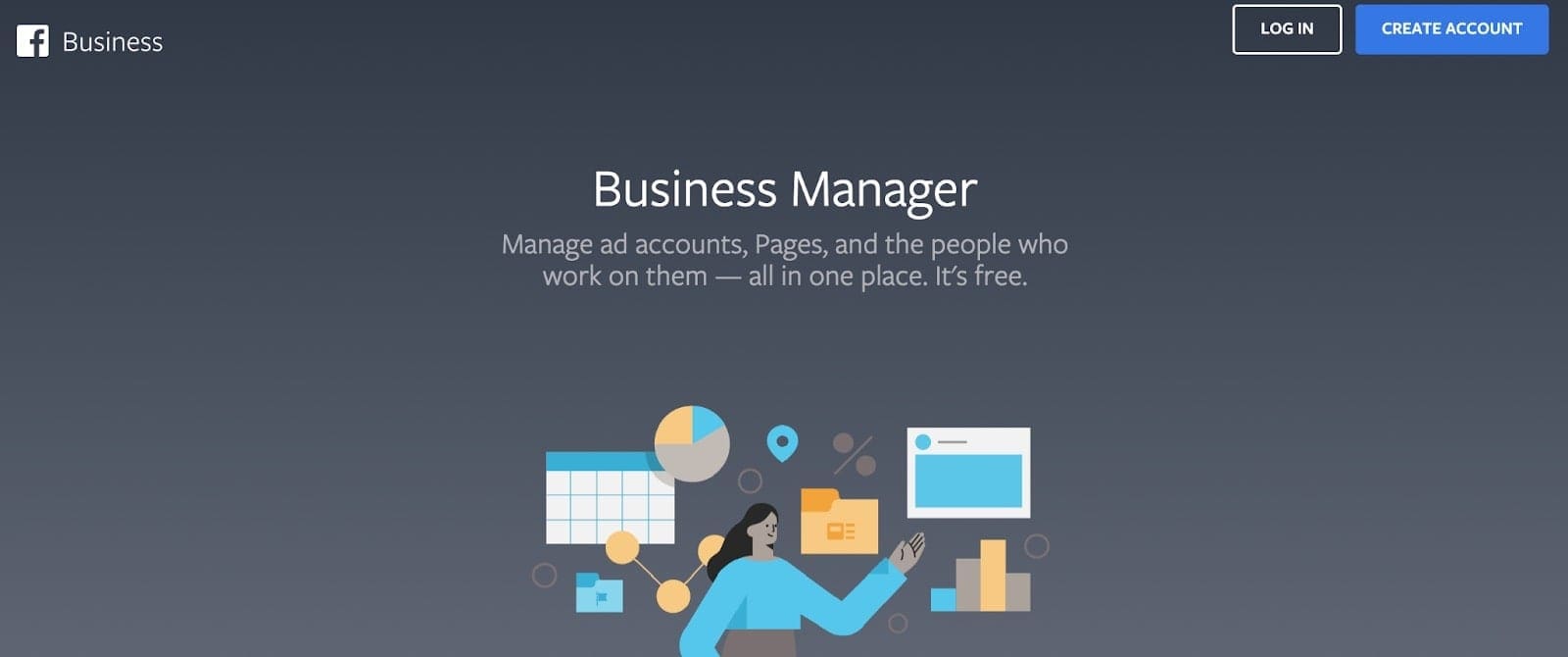
Facebook business

For influencers: Sharing assets with your brand partner 

Influencers will then need to give brands access to the content within Facebook Business Manager. 

1.Simply, open Facebook Business Manager > Business Settings > Users > tap Partners.
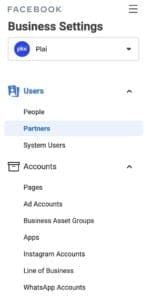
add facebook partner

2. Then, tap the Add dropdown > select Give a partner access to your assets
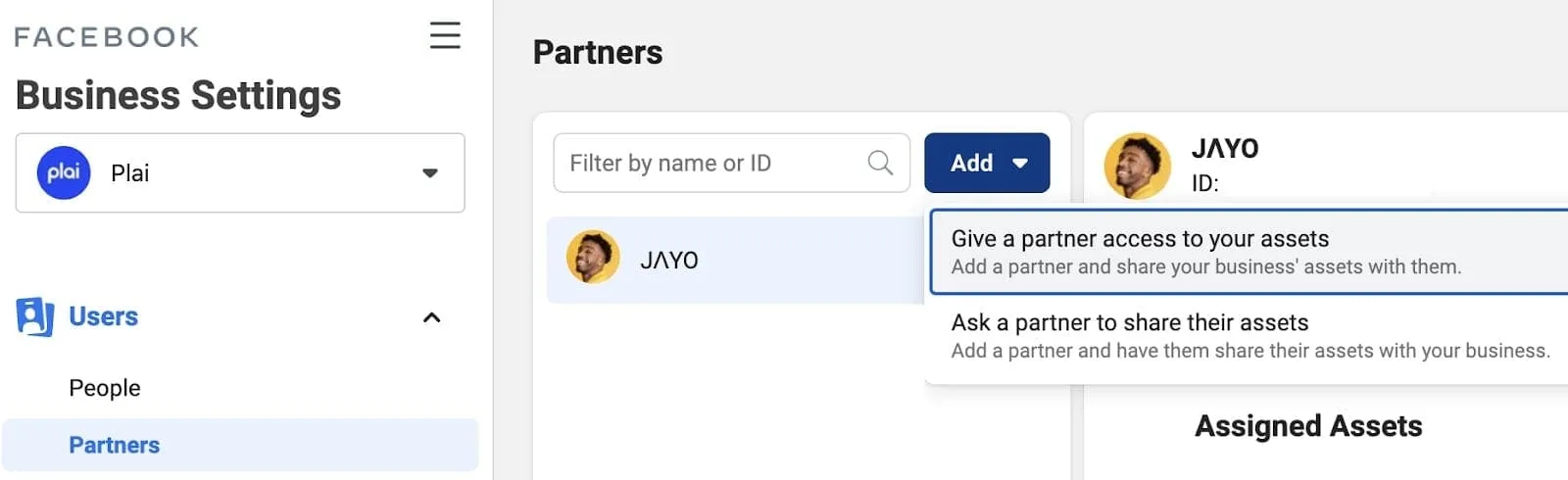
facebook whitelisting _ influencer whitelisting

3. Enter the brand’s Facebook Business Manager ID > tap Next.
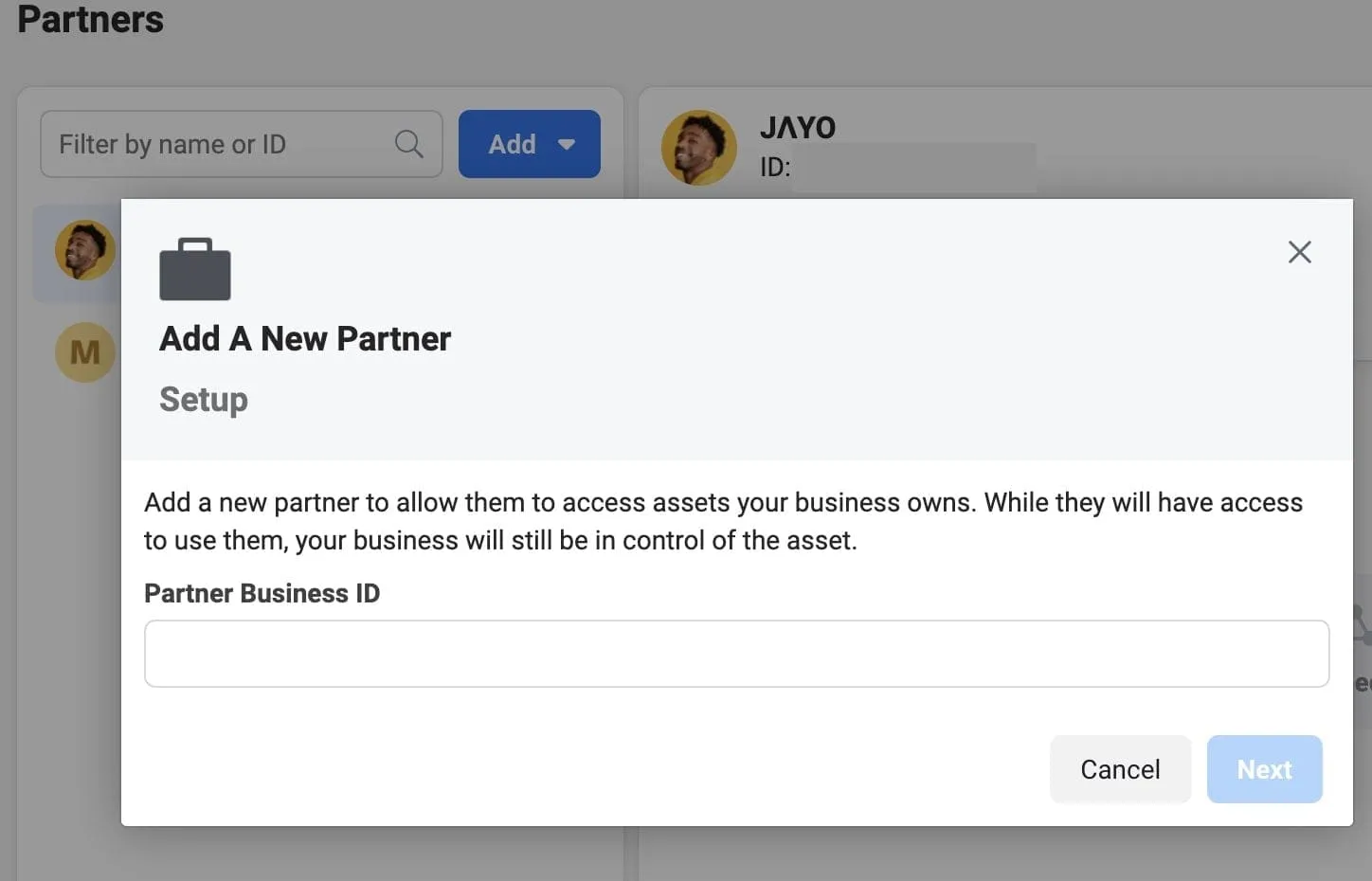
add new partner Facebook _ influencer whitelisting

4. Select Assets and Permissions for our brand partner to access

5. Choose the Facebook Page and Instagram Account Assets the brand will use for whitelisting.

Top tip:  For greater audience targeting, request access to Pixels to help your brand build custom audiences that match your target customer demographics.
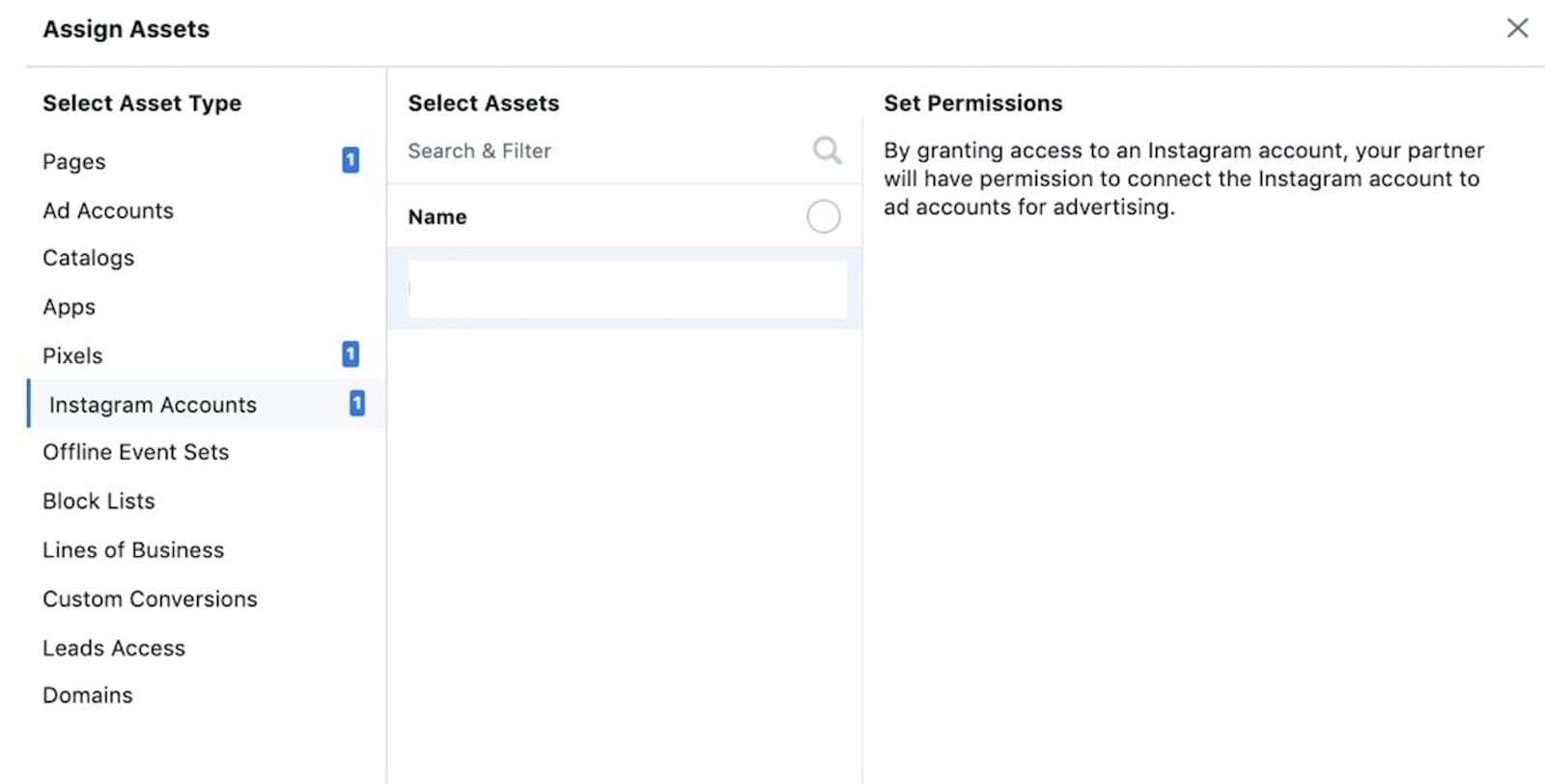
Facebook ads _ influencer whitelisting

6. Set the permissions level to Create Ads.
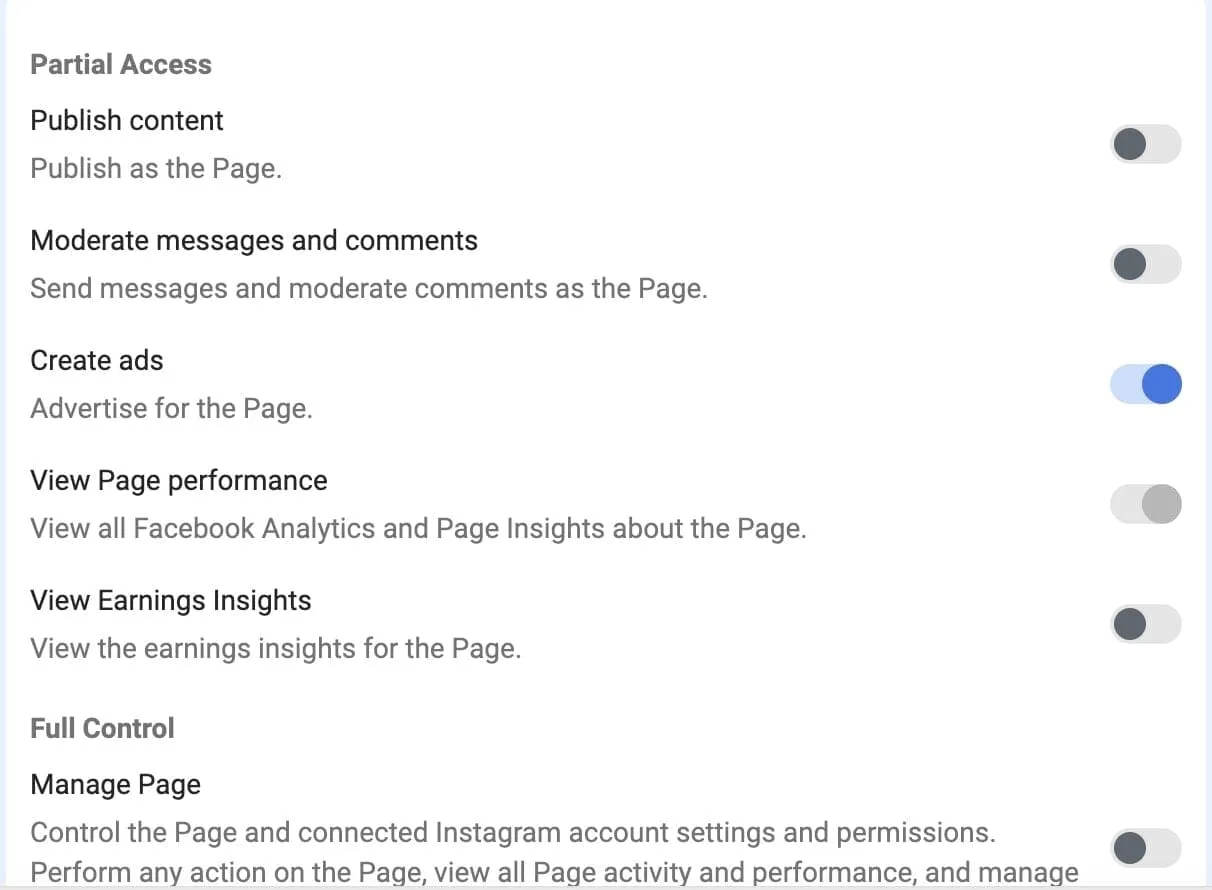
create Facebook ads _ influencer whitelisting

7. Last but not least, Save changes.

Your influencer’s Instagram account and Facebook page are now ready for whitelisting!

You’re set up for influencer whitelisting, now what?

Tips for maximizing the impact of whitelisted content

Your influencer’s Instagram account and Facebook page will be visible in your own Facebook Business Manager. You can now start to create ads and build custom audiences via their Facebook page or Instagram account. 

Running ads through influencer whitelisting is a great way to promote an influencer’s 5-star review of your product. You can create an ad using a clip from their review video, or reshare photos of them using your product with a quote about how much they love it. Using a tool such as Plai can help you build better ads thanks to insights on analytics and content trends in your niche for more precise targeting. 

Using influencer whitelisting to target custom audiences will help you to reach new audiences, including people outside your influencer’s followers. Creating lookalike audiences will help you to reach a high volume of relevant social media users, who share the same interests as your influencer’s organic audience. 

Now you’ve got the basic steps down, check out our webinar in partnership with Plai where our experts share their top tips for driving ROI with influencer content amplification. 

Learn more about the key steps needed to run a successful campaign in our guide, Everything You Need To Know About Running Influencer Marketing Campaigns. 
Upfluence_Guide_Running Influencer Marketing Campaigns

Want more tips to run successful campaigns?

Visit Resources Center

Our clients success stories

Campaign analytics illustration
Valabasas -Upfluence client
14x ROI

Valabasas drives 14x ROI turning influential customers into brand affiliates

Read story
Influencer marketing platform illustration
marcer labs
6x ROI

MercerLabs drives 6x ROI with creator affiliate program

Read story
Creator collaboration illustration
Marriott - Upfluence client
11M+ reach

Marriott Bonvoy campaign reaches 11M through Niche Creator partnership

Read story
Drive sales 
through creators

Want to go start scaling your creator programs? Book a call with our experts today and tailor Upfluence to your needs.

Get Started

Everything you need, in one place

Find Influencersnav img find mobile (1)Manage Programsnav img engage mobile (1)Influencer Paymentsnav img pay mobileInfluencer CRMfeat crmJaice AIfeat jaiceInfluencer APIfeat apiInfluencer Marketplacenav img scale mobileInfluencer Analyticsnav img analyze mobileBuild your ownnav img api mobileInfluencer Outreachfeat outreachProduct Giftingfeat giftingIntegrationsnav img integrations mobile
Compare vs.AspireModashCreatorIQKolsquareGrinShopmy
The technical storage or access that is used exclusively for anonymous statistical purposes. Without a subpoena, voluntary compliance on the part of your Internet Service Provider, or additional records from a third party, information stored or retrieved for this purpose alone cannot usually be used to identify you.Customize {title} {title} {title} Manage consent
Upfluence
Users Love UsHigh PerformerTop Influencer Marketing PlatformsAmazon Ads Verified Partner

Upfluence Newsletter

Product
  • Find Influencers
  • Manage Programs
  • Influencer API
  • Influencer Analytics
  • Jaice AI
  • For E-Commerce
  • For Affiliate Programs
  • For Agencies
  • Upfluence Marketing Agency
Resources
  • Research
  • Blog
  • Customer Stories
  • Guides
  • I’m a Creator
  • Help Center
  • API Documentation
About
  • Meet the Team
  • Careers
  • Affiliate Program
  • Partner Program
  • Press Kit
  • Pricing
  • Contact us
  • Privacy Policy
  • Live Capture Policy

© 2026 Upfluence. All rights reserved.

Secret Link
Manage Consent

We use cookies to measure site traffic and, with your consent, to personalise ads with partners like Google, Meta, LinkedIn and Microsoft. You can change your choice anytime via “Cookie settings” in the footer.

Functional Always active
The technical storage or access is strictly necessary for the legitimate purpose of enabling the use of a specific service explicitly requested by the subscriber or user, or for the sole purpose of carrying out the transmission of a communication over an electronic communications network.
Preferences
The technical storage or access is necessary for the legitimate purpose of storing preferences that are not requested by the subscriber or user.
Statistics
The technical storage or access that is used exclusively for statistical purposes.
Marketing
The technical storage or access is required to create user profiles to send advertising, or to track the user on a website or across several websites for similar marketing purposes.
  • Manage options
  • Manage services
  • Manage {vendor_count} vendors
  • Read more about these purposes